Webflow Conf 2025: All Announcements Summarized
Every Webflow Conf 2025 announcement in one place: AI page builder, CMS upgrades, collaboration features — and what each means for B2B marketing teams.
Webflow Conf 2025 announced significant platform advancements including enhanced CMS capabilities, improved design tools, expanded developer features, and new collaboration functionality. Key updates strengthen Webflow's position as the leading visual development platform for marketing teams and agencies. These announcements accelerate Webflow adoption for B2B companies seeking modern, marketer-friendly website infrastructure with enterprise-grade capabilities.
Webflow announced a bunch of updates that make it easier to design, build, and scale websites — whether you’re a solo designer, part of a dev team, or managing big client projects. The focus this year was on AI, better teamwork tools, stronger hosting, and more power in the CMS.
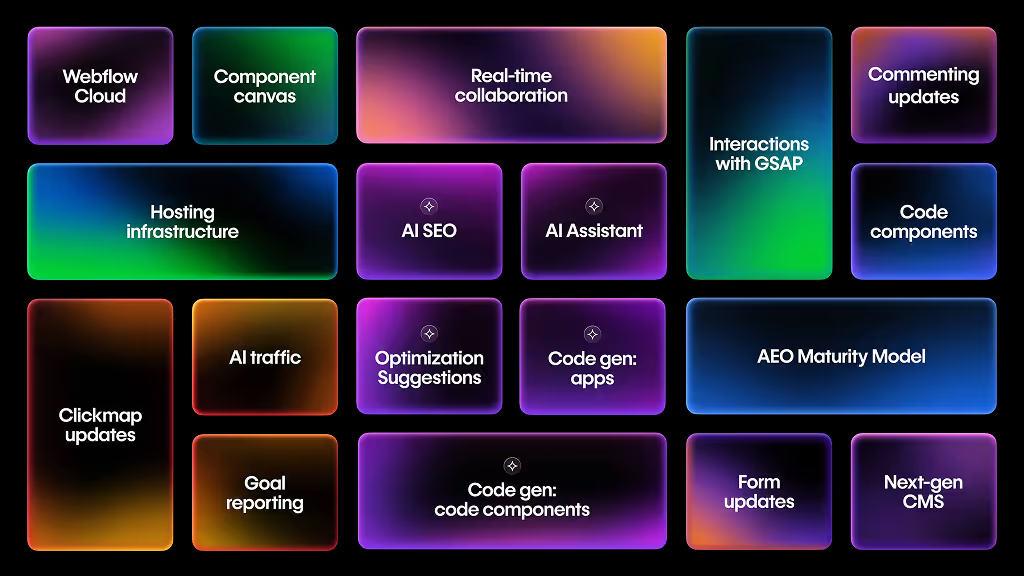
The Main Announcements
1. AI is getting smarter inside Webflow
- A new AI Assistant can now understand your site’s styles, classes, and structure. That means you can ask it to suggest or make changes, instead of clicking around endlessly.
- AI can also generate working code (like a booking system, dashboard, or calculator) from a simple prompt, and plug it straight into your Webflow site.
- For SEO, the AI will help you with meta tags, alt text, and even structured data, so your site is more search-engine and AI-engine friendly.
Less manual work, faster builds, and better visibility in Google and AI tools like ChatGPT.
2. Collaboration & teamwork just got a lot smoother
- Multiple teammates can now edit the same page at the same time, Google Docs style.
- You can share a link with clients or reviewers in comment-only mode, so they can leave feedback without needing a Webflow account.
- A new Component Canvas lets you manage all your components in one place and see how changes flow across the whole project.
- Developers can bring in custom React components (via DevLink), which still show up in Webflow’s visual editor for designers to style.
Less back-and-forth, faster feedback loops, and a clearer way to scale big projects with teams.
3. Design & animations got an upgrade
- Interactions now run smoother, with GSAP support and more control across breakpoints.
- Accessibility settings have been improved (so you can design fancier sites that are still usable for everyone).
- Later this year, Lottie integration will make animations even easier to add.
More creative freedom while still keeping websites professional and user-friendly.
4. A stronger CMS + better hosting
- The CMS has been rebuilt from the ground up so it can handle more data, bigger projects, and AI-driven use cases.
- Content APIs are opening up to everyone, making it easier to send content to other platforms (apps, external tools, etc.).
- Webflow is moving its hosting to Cloudflare’s global network — which means faster sites, better reliability, and higher security worldwide.
Clients with larger or more complex sites (like SaaS companies, big blogs, or marketplaces) will now get smoother performance.
5. Analytics, SEO & forms improvements
- The Webflow Analyze tool will now give you deeper insights, including where your traffic comes from (even AI engines).
- You’ll be able to set different email notifications per form and manage spam more easily.
- A new “Answer Engine Optimization” model will help make content ready for AI search engines, not just Google.
Smarter decisions from data, less spam headache, and future-proof SEO.
When are these coming?
- Some features are already live (like React code components).
- Real-time collaboration and AI tools are in testing but will roll out later this year / early next year.
- Hosting migration and CMS improvements are being phased in across 2025.
What This Means for Webflow Developers
- Work faster → AI will save you time on coding and repetitive tasks.
- Work better as a team → Collaboration tools mean fewer bottlenecks.
- Handle bigger projects → The new CMS + Cloudflare hosting make Webflow more enterprise-ready.
- Impress clients → You can now pitch faster builds, better performance, and future-proof SEO as key selling points.
Webflow is no longer “just a no-code tool.” It’s turning into a design + development + hosting powerhouse that mixes visual building with the flexibility of real code and AI.
Frequently Asked Questions

What Is Webflow Conf?
Webflow Conf is the annual conference hosted by Webflow, bringing together designers, developers, and digital leaders to explore the future of web design and no-code development. The 2024 edition brought together thousands of attendees for talks on emerging web technologies, practical design strategies, community showcases, and networking opportunities. Webflow Conf represents the state of professional web design and development, showing where the industry is heading and how no-code platforms are reshaping digital work.
Key Themes from Webflow Conf 2024
The 2024 conference focused on several critical areas: AI integration into design workflows (how designers leverage AI for faster iteration while maintaining brand control), the rise of AI-powered content generation and personalization, accessibility as a core design practice (moving beyond compliance to genuine inclusion), developer experience improvements making advanced functionality more accessible, and the intersection of design systems and no-code platforms. Sessions highlighted how forward-thinking companies are using Webflow not just for websites but as a complete digital platform strategy. Enterprise adoption of no-code tools emerged as a major trend, with large organizations recognizing that Webflow enables faster iteration and lower long-term maintenance costs compared to traditional development. The conference reinforced that modern web design is about strategic thinking first, tooling second.
Practical Takeaways for Design and Development Teams
Attendees walked away with actionable frameworks: building design systems in Webflow that scale across teams, using advanced interactions and animations to differentiate user experience, implementing accessibility from project start (not as afterthought), leveraging Webflow's CMS for dynamic content strategy, and integrating third-party tools and APIs for complex functionality. Case studies showed real companies increasing conversion through thoughtful Webflow implementations, building complex SaaS platforms on Webflow rather than custom development, and managing multi-market websites with Webflow's localization features. The practical message: Webflow is no longer just for marketing sites but a legitimate platform for complex digital properties. Teams that mastered design systems, component thinking, and CMS structure out-performed those treating Webflow as a glorified drag-and-drop tool.
Community and Networking Impact
Webflow Conf is as much about community as content. The conference brings together designers solving similar problems, developers pushing Webflow capabilities, and agencies sharing learnings. Networking sessions, community showcases, and peer conversations often generate more value than formal talks. Many attendees discovered new agencies, partnerships, and collaborations at the conference. The community aspect reinforces why Webflow is thriving: behind the platform is a vibrant ecosystem of professionals pushing creative and technical boundaries together.
The Future of Web Design Post-Conf
Webflow Conf 2024 highlighted that web design is becoming more strategic and less decorative. The best designers aren't those with the most impressive visual effects but those solving real business problems: acquiring customers faster, reducing churn, improving conversion, and building sustainable digital products. Teams that combine design thinking with technical capability—understanding both user experience and CMS architecture, both visual design and component systems—deliver superior results. If you attended Conf or watched sessions afterward, the key is implementation: take one insight from the conference and apply it to your next project.
Looking to leverage Webflow for your business strategy? Explore our Webflow expertise and approach, see case studies of Webflow implementations we've executed, or discuss how Webflow can solve your digital challenges.
No, Webflow did not acquire GSAP (GreenSock Animation Platform). GSAP remains an independent animation library developed and maintained by GreenSock, a separate company. While Webflow integrates well with GSAP for advanced animations, these are two distinct technologies with separate ownership and development roadmaps. Many designers use both tools together to create sophisticated, performant animations on Webflow sites.
How GSAP integrates with Webflow
Webflow's visual interactions provide excellent baseline animation capabilities, but GSAP offers professional-grade control for complex sequences and timeline-based animations. You can embed GSAP into Webflow projects through custom code, allowing developers to leverage GSAP's powerful animation engine while maintaining Webflow's visual design advantages. This combination is particularly valuable for portfolio sites, product demos, and interactive experiences.
When to choose GSAP for your project
If your website requires advanced animation sequencing, precise timing control, or performance optimization for complex animations across different browsers, GSAP is worth the investment. It's especially useful for B2B websites that need to showcase sophisticated product interactions or communicate complex processes through animated narratives.
The practical advantage
The independence of both platforms is actually beneficial for users. GSAP continues innovating as an animation specialist, while Webflow focuses on the complete web design and development experience. This specialization ensures you get best-in-class tools for each discipline without compromise.
Explore how strategic design enhances user engagement through our website design and development services, or contact our team to discuss animation strategy for your project.

